Showing posts with label Apple. Show all posts

Sunday, June 11, 2023

Swapping MacBook screens

Well, Margretta’s old 2011 headless MacBook Pro is still running. But swapping out a new screen didn’t fix its problem. Namely, it doesn’t have a working screen, which is a real bother, complicated by the fact that I actually need a laptop that will also run Snow Leopard (mid-2011 was the last year that the Snow Leopard OS was supported) for editing and scanning software that too has been rendered obsolete. Not to mention software for those back taxes.

And it’s nice to have a laptop I can move around. You know, actually use on my lap. Margaretta’s old MBP is tethered to an wonky lavender-hued external Apple LCD monitor—which is also losing its resolution. Now, I love lavender and all things purple, but not on a screen. It’s OK for Netflix, but makes editing photos a nightmare. I harbored some vague hope that swapping screens would work, I had nothing to lose. It was way easier than I expected, so I was pretty chuffed.

I do have other obsolete MacBook Pros, but this one was once my main squeeze for a few years as it has most of my work (photo archives) on it. And it runs my scanning and editing software. I have an exceedingly pricey top of the line Epson negative film scanner that cost $1200. Scanning old negatives was my big pandemic sequestration project.

I have file cabinets of thin black and white negatives of famous artists musicians and writers I need to bring into the 21st. c. (See a few samples here.) Reason enough to keep a working version of Snow Leopard alive. And before you ask, yes, I tried some of the newer third-party scanner software. No joy.

Then there are those back taxes. Shhh! As a teaching artist/poet, I make so little money, I am below the poverty belt, so to speak, but because I am also self-employed, I might as well be a billionaire as far as filing complicated taxes goes. 

Wednesday, June 23, 2021

Salvaging retro-media


Today is a double-retro media day, liberating James Lee Burke from the ferrous oxide confines of audio cassette books to the cyberworld of digital media format. One MacBook is running Audacity to convert old audio cassette tapes. The other, transcribing CDs. Nothing went swimmingly. It’s complicated.

Imagine my surprise when I ordered four audiobooks on eBay, only to discover they were all on audio cassette tapes. TAPES! Ouch. I did not see that coming. But I was determined to listen to his books, so I had to reinvent the wheel, which meant hauling out an old 2010 MacBook, and borrowing a cassette recorder that had USB connectivity. Of course it wouldn’t work. Of course not. No instructions either. Made in China. You get the picture. Quality Google time, I found I needed Audacity too. OK, retro software. I haven’t used Audacity in 20 years. TG for open source software, it was still around. Many hat tricks under the bridge later, I got it to work, sort of—by using an auxiliary speaker. 

I discovered that Bluetooth speakers won’t work with retro MacBooks or software. Workaround: a speaker wire. My kingdom for a freaking speaker wire. Housesitting’s a btch when you need doohickies. 

Speakerwire scored, two days later. But the recording was too distorted when played through speakers. So I swapped the speaker for headphones and fiddled some more and got Audacity to recognize the USB connections from the audio cassette player. Voilá. The right stuff. The process made me reevaluate the aphorism, third time’s a charm. In my case, third time was pure luck. But the process sure wasn’t intuitive. Not exactly ProTools.

I’ve also learned how to transcribe and clean up audiotapes. I now know what the sound waves of an electronic fart looks like, or an electronic pop, and the difference between them and a terminal K or S, and plosive Ps, or the reader gasping for breath. I learned you can remove much of a word’s sound wave to eliminate distortion (a lot). And it still sounds like a word. Luckily only one tape needed doctoring. But time was not kind to the slide guitar intros, transitions, and exits. So I learned how to clean them up too. Thank you Carlos, sound guy for the Red Hot Chili Peppers, for letting me look over your shoulder in the recording studio so many years ago. Osmosis happens.

Also, I wanted to move New Iberia Blues to my music files so I could listen to it again later on my iPad vs my car CD player, as much of it is poetry. This man writes pure poetry on the slant. I about died when he described the sky or the bayou. I have to rewind and listen again. And again. And again. This man has a bad case of metaphor and he knows how to use it. A writer’s writer. And yes, I do get the obscure literary references embedded like Easter eggs throughout his stories. 

So I popped a CD into my MacBook, fired up iTunes. Nada. I hadn’t counted on my disk reader being wonky. I popped in another CD, nada. Since, I knew Toast worked on this old MacBook, I fired it up, and it triggered the DVD player to read the CD. Talk about going around the horn. By disk 10, I learned the trick, slam that mothersucker into the CD slot like a curve ball over home plate, top of the 9th, bases are loaded. And iTunes arrives all out of breath, wanting to know the score.

Why all the bother, you ask? Why not just buy a digital copy and use an iPad/Pod/Phone? Good question. Most of James Lee Burke’s work has not made it to digital format. And I have an old car with a CD player, no USB or auxiliary functions. The fake radio bluetooth workaround doesn’t work. So if I want to listen to James Lee Burke’s work, I need to go to extreme workarounds.

But I think I’ve met my match with Sunset Limited. I fixed one busted tape, rewinding and splicing it onto a new cassette holder, recorded it with only two bust-ups. TG for ScotchTape. But the final cassette rewound wrong and got tangled. Even I can’t fix this one. So close to the end too.

Thursday, June 10, 2021

MacBookPro journals

A couple of months ago, I managed to find a mid-2012 MacBookPro I planned to soup up. I was just about to buy one last year when COVID-19 struck. That put a big wrench in things. No one wanted to meet up. Not for love, nor money—and certainly not for old MacBooks. 

After a few Marketplace deals fell through at the last minute, I despaired. One seller gave her MBP to her brother at the last moment—as I was leaving to pick it up. But the real asscake was the guy who sold the MBP I had planned to purchase—during the time it took me to drive down from Sonoma to SF. 

He then tried to fob off another dead MBP in its place, saying, Yeah, it works fine but the battery is dead. Yeah, no. I felt like I was in the Monty Python dead parrot sketch. I tried all the restart tricks in the book, including attempting to jumpstart it with a portable hard drive with an OS. Dead motherboard, and the battery indicator was green. After trying to sell it to me for parts, he handed me the dead MBP as a doorprize—but, hey, at least the battery was good, I swapped it out.

I am amazed by all those oily Marketplace guys offhandedly trying to fob off their lemony laptop’s age, or obfuscate its speed, or hide its lack of memory. As if I wouldn’t notice. After months of scanning ads for overpriced MBPs on Marketplace (Craigslist was useless), I finally found a likely candidate. It had to be a faster mid-2012 MacBookPro, not early-2012, not late-2012 (non-upgradable Retina). And not too expensive. 

I met this guy in the Richmond Costco parking lot, he was solid, not trying to hide anything. After a cursory check, I didn’t even barter—I paid more than I wanted for his MacBook Pro—$300. But it had good bones and a fast GhZ speed. My fastest used Mac purchase ever. I didn’t even need to run the usual checks. 

Besides, he had also upgraded it to Catalina at my request. That was the deal clincher. He had no idea that it would even run Catalina. As I put it through its paces, he looked at it anew. I was afraid he’d change his mind right there in the parking lot. I paid him off so fast, I forgot to get a bill of sale. Alas, I needed Catalina to run TurboTax. It seem the only reason I ever upgrade my MacBooks is to run tax software. A sad state of affairs.

Monday, December 24, 2018

Wild Apples


The apples are good from this feral volunteer that chose to grow on a rocky outcrop

An otherwise lovely story on apples in The Guardian that appeared last May, claimed that all apples came from Kazakhistan. My immediate knee-jerk reaction was that the statement was wrong on so many levels.

The geographic origin of the apple can be traced to modern-day Kazakhstan but the Romans are the ones that popularized it the most. Gardens: why we need to protect Kazakhstan’s wild apples
And the more I delved into that sentence, the more wrong it seemed. My second thought was: What were the Romans doing in Kazakhstan, anyway? Did I miss that history lesson? And what about the native apples of Asia? Merely hearsay? The chase was on.

I agree we need to protect Kazakhstani apples, but the birthplace of the modern apple is Central Asia, specifically the Altai and the Tian Shan Mountains—which includes not only Kazakhstan, Kyrgyzstan, Turkmenistan, Uzbekistan and Xinjiang in Northwest China—in other words, the Silk Road. The sentence should have scanned: "modern apples." And my hackles wouldn’t have been raised. (See the Smithsonian article for a more accurate history.)

Despite popular belief, a species of wild apples (Malus sylvestris) were already in the British Isles long before the Romans arrived (they just brought bigger, better apples). Circa 98 AD, Roman historian Gaius Tacitus reported that the Briton Druid Ovates carried silver apple boughs with bronze, silver, or gold bells. And in Ireland, Otherworld apples also feature prominently in Echtrae Chonnlai which was recorded in the 8th or 9th c., but it's a much older tale. And in The Song of Wandering Aengus, Yeats made famous the lines lifted from Irish folklore, The silver apples of the moon, The golden apples of the sun

But the wild European crabapple was native to the British Isles long before the Romans or Christianity reached its shores. In fact, there is evidence that wild apples grew wild in Ireland and Britain during the Neolithic era. It’s a Northern Hemisphere circumpolar boreal plant along with raspberries, salmonberries and roses, buttercups, crucíferos plants, hazels, and vaccinium species including cranberries and blueberries.

The word apple is embedded in many insular place-names that predate Roman occupation in the British Isles. Anglesey, the Isle of Apples, Avalon. Anglesey (Ynys Môn) was sometimes called Afallach, or rich in apples. Geoffrey of Monmouth called the island Insule Ponorum, or the island of the apples. In Immram Brain, a síd woman gives Bran a silver branch in white bloom—a cróeb dind abaill a hEmain, or ‘a branch from the apple-tree of Emain. Emain Macha was sometimes called Emain Ablach. –The Apple in Early Irish Narrative.

When I was living in the Ukraine, I was struck by how similar the word apple яблоко yablacko in Russian is to the Irish (genitive) Ablach, clearly a shared Indo-European ancestry.
From Old Irish uball, ubull (Scottish Gaelic ubhal), from Proto-Celtic *abalom (compare Welsh afal), from Proto-Indo-European *h₂ébōl (compare English apple, Lithuanian obuolỹs, Russian я́блоко (jábloko), Serbo-Croatian jȁbuka). —Wictionary
And the Celtic apple of the day would've been a quasi-domestic relative of the wild European crabapple Malus sylvestris, aka the small forest apple, not the ancestor of the modern apple, Malus sieversii (native to the mountains of Turkey and Kazakhstan).

The symbol of the apple wasn't necessarily a tradition borrowed from the Middle East. Or the mid-way point to the Far East. Greek historical references to apples predate Roman cultivation, and the role of the apple is central to Bronze Age Celtic lore. Even Homer's Odyssey refers to apples. Then there's the apple tussle of Aphrodite, Athena and Hera to consider. You know, like, Who's the most beautiful goddess of all, and the sour apples of discord? (Those apples may have been quincesnative to the Caucasus.) Fairytale heroine Snow White chokes on an apple and falls asleep for a very long time.

The Greek word "μήλον" for apple or any kind of globular, or round fruit, and fat-bottom girls—is malon, or melon. Think generic. Sort of like asking for a Coke and getting orange soda. In Homeric times, "μήλον" also referred to sheep or goats (my mind wanders to that tree of goats photo). Pomaceous: anything-apple-shaped. Round. There must've been some seriously fat goats. Poet Sappho of Lesbos likened a young bride to an ‘sweet apple’ (gluku’malon). Better than being compared to a fat goat.

When does the word apple enter into the English translation of the Bible as THE depicted forbidden fruit? Bede? (late 7th c.) Aldred? (10th c.) John Wycliffe? (late 14th c.) King James? What was the Latin word: fructus, or malum? Or was it the more drought-tolerant quince? (The Irish monk-scribes would've been reading the Bible bits in Greek and Latin.)

There were certainly native European crab apples in the British Isles since the last Ice Age, but the problem is even thornier than that. Get this: apples, indigenous to cold northern climates, weren't even a Levant fruit. Too dry and too hot. Even way back then.  (They're now carefully propagated in the Golan Heights.) The so-called "apple" of the Holy Land was most likely a sturdy, heat-tolerant quince, popular in the Levant. The apple would've been an unknown fruit in the Middle East during Biblical times. There goes the old Tree of Knowledge metaphor.

I also discovered that the word "apple" was used as a generic term for ALL globular (foreign) fruit and some vegetables (not berries or nuts), as late as the 17th century. Tomatoes were called love apples, cucumbers and potatoes, earth apples. Even oranges were referred to as apples. Because they were ROUND!

The two words for apple and evil in Latin are also a tongue-in-cheek pun: Eve ate a malum (apple—or something fat and round), and became mālum (evil). The Arabic for apple is tuffah, Hebrew is tappuach, from the Aramaic. But it was probably a borrowing, as the so-called apple of the Holy Land was most likely a quince. The apple would've been an unknown fruit in the Middle East during Biblical times.

Also, it's a western European concept to associate apples with the Tree of Knowledge. (When? Probably since the late Middle Ages. The apple is depicted in art during the Renaissance.) So, the much maligned apples were not necessarily considered to be the forbidden fruit during the 6th - 8th centuries. 


It's a muddled idea, at best. Or perhaps it's all muddled old road apples.

The modern apple, Malus pumila, or M. domestica, related to the wild forest apples, the Asian Malus sieversii, and Malus silvestris seems to have had a wide geographic distribution from the British Isles to Central Asia, and then some, and there are no less than four other malus species in North America. It's probably a circumpolar Ice Age relic holarctic plant species like vaccinium.

So, if apples came from Kazakhstan, how in the bleeding blue blazes did they arrive in North America before Columbus, or, say, Lief Erickson? And don't tell me Johnny Appleseed, hero of cider makers everywhere, planted them all. He did sow the Northwest Territories with apple trees. Since he used apple seeds, gawd only knows what wild varieties sprouted since apples don't seed true to form.

In fact, crab apples are also native to the entire Northern Hemisphere. (I had previously learned that apples were brought to the New World by colonists, and scholars still erroneously note European apples originally came by way of Kazakhstan, or China, along with the peach, which really messes with the myriad apple references embedded within Medieval Celtic mythology.) 
 
I am fascinated by the evolution of the apple. With the streamlining of marketable apples, we're down to a handful of tasteless eating apples with names like Fuji, Pink Lady, and Gala. Our Italian neighbor, Mary Bianchi, in Forest Knolls, had cooking apples (monstrous sour things), plus a variety of eating apples including striped winesaps, Gravensteins, and also bitter cider apples.
"Hard apple cider was hugely popular in early America, and cider vinegar was an essential home ingredient." According to Oregonian heirloom apple hunter, David Benscoter, “It is estimated that of the 17,000 named apple varieties originating in North America, only around 4,000 still exist today." —Apple detective finds five more apple varieties thought to be extinct...
According to most definitions, the main difference between a crab apple and an edible, domestic apple is the size of the fruit (and the sourness). But it's more complicated than that. Farmers and cider-makers traditionally waited for the bitter fruit laden with tannin to be kissed and sweetened by the first frost before harvest (similar to bletting).
The familiar edible apples did not grow in North America before the arrival of European settlers. Old World apple trees became established in the New World from the trees and seeds that Dutch and English emigrants brought from Europe. As legend has it, Johnny Appleseed profoundly influenced the spread of apples in North America by sowing them everywhere he traveled, but he was just one of many pioneers who planted apple seeds in the new territories. The original cultivated apple trees also became established naturally through seeds dispersed by birds and mammals. Old World Apples. [For more on Old World apple species, see also "Old-Time Apples," THE WORLD & I, October 1989, p. 388]
Before European apples were introduced to the New World, crab apples were native to North America. Although less familiar than commercial apples, these native American species still grow in the wild. 

In North America, there's Malus ioensis, or prairie crabapple (ioensis refers to Iowa). The most common variety, Malus ioensis var. ioensis, is native to the prairies of the upper Mississippi Valley. Another variety, Malus ioensis var. texana, or the Texas crabapple, is native to a tiny region of central Texas. There's even a Southern crabapple, Malus angustifolia. Then there's Malus fusca, native to western North America from Alaska, with a range from British Columbia, to northwestern California. Flowers are white or pale pink. 

According to a blogpost, Native American Apple, plant taxonomists may quibble over the number of apples native to North America, but most agree that there are four major species. The three eastern species are quite similar to each other. But the lone western species is a bird of a different feather. The western species shares similarities with wild apples native to China, while the three eastern species seem to have Middle East connections—thought to have split off early in the evolution of the genus Malus.
There are an estimated 25-47 different species of Malus worldwide. This number fluctuates greatly due to the ease in which species of Malus are able to hybridize with each other, making the process of differentiation between the species very difficult. Of this number, only four species are native to North America. These species are Malus fusca, Malus coronaria, Malus angustifolia and Malus ioensis. Crab Apple Trees Native to North America.
But worldwide, wild crab apples have become endangered, due to farmers preferring to grow commercial table apples to cider apples (cider crab apple varieties include Foxwhelp, Kingston Black, Yarlington Mill and Dabinett.)

In northern California, there was a wild crab apple tree in the gulch across the way from us where my grandmother used to gather the apples after the first frost. I loved eating them. I never considered it a native species. The diminutive apples were dense, with golden yellow pulp, sweet, but with a bitter astringent afterbite. It was probably a Pacific crab apple or Oregon crab apple. One fall, our new neighbor, in an attempt to tame the land, viciously hacked it down with a chainsaw, and we mourned its loss.

Now, decades later, after I learned that the old crab apple tree wasn't an escapee from some farmer's orchard by way of pooping birds, but a native species, I doubly mourn its loss.

Wednesday, March 7, 2018

Updating old technology for tax season: The horror! The horror!


I'm about to upgrade to El Capitán/High Sierra, as my trusty Mac OS companion of 8.5 years, Snow Leopard, is no longer long of tooth, but bereft of any pearly whites whatsoever. The latest discovery that the Intel chip has a back door, much to the delight of Hackers Anon, means every technological agency is tightening up bootstraps in order to stick their big toes (and cocks—whatever is largest) to shoal up the wall of data vulnerability.

And in turn, data service providers are also tightening things up. This translates to my web browser Firefox being no longer upgradeable, Safari  5 is next to useless, having long since lost The Great Browser Race. I can't even load a Daily Kos petition because my browser's too old and therefore "vulnerable." I can see tighter security needed if I'm actually donating money (I'm not), but to fill out a petition? And who knew that MacWorld articles were top secret documents FYEO fergawdsakes? (For your eyes only.)

Then there's the new and improved software: take TurboTax. Ah, yes, the tax season rears its ugly head, and shoves it up yer arse looking for fool's gold. That's the litmus I use to update software. When I need to load TurboTax. That's how I updated another hard drive to Mountain Lion, and later, to Mavericks.

Suffice to say, I hated both Mountain Lion, and Mavericks with a passion (I hated all the OS updates until Catalina), but I managed to convince TurboTax to play nicely on my MacBook, so I could file my taxes. Sort of. (BTW, TurboTax did not require such stringent hoops for Windows users during this time. And we KNOW how vulnerable Windows is. My partner has an old PC laptop with a crusty virus-ridden version of Windows that still runs TurboTax. What's with that?)

So, after I blithely purchased this year's version of TurboTax, I read the FINE PRINT. Minuscule. Unreadable without a microscope, or #2 readers, whatever's handiest. Minimum system requirements, written in 6 point white type on grey background: such secretive minimum operating system requirement: OS 10.11. Whoa, Nellie! That's El Capitán. O Captain! My Captain! Decapitate me now.

We went from the rogue sneaker waves of Mavericks, that's OS 10.9 to you, to the heights of Machu Pucchu, I mean—that mile-high monolith, that sheer granite wall of El Capitán, AKA OS 10.11, that has challenged so many climbers—in one fell swoop? In one year? What happened to OS 10.10? Holy crappy crampons! The Krampus came late this year. Or he came back for seconds.

So, (remembering to breathe), I took a shot, and steeled my nerves. I girded my loins, and began to upgrade a hard drive to El Capitán. Painful. After more than an hour of upgrading, it worked swimmingly. Until it didn't. This I found out after I went two OS'es further down the plankety-plank road to perdition, to the holiest grail of OS of time present—High Sierra, AKA OS 10.13. Lucky 13, it wasn't. I was locked out. Epic password fail. Black screen. Spinning cursor of death. Random restarts. Complete disappearance of the Finder. Again. And again. And again.

So I spent an entire day (and most of the next day too), trying to coax two fussy operating systems to play nicely on my souped-up 2011 MacBook Pro. I learned some things. New tricks, old dawg. I practiced deep rebuilds and even deeper cleanses. I gnashed my teeth. I invented new portmanteaus swearwords. Corrupted kext files? I found combo update fixes. Suffice to say, El Capitán is now working. Or at least, I can load it. I haven't even opened TurboTax. Too exhausted. I'm afraid to even restart High Sierra.

Ah, well, there's always next year.

Saturday, June 10, 2017

Hotroddin' my MacBookies


These days I'm using as my main computer, a headless 2011 MacBookPro 8,1 tricked out with 16 GB memory & a Seagate hybrid drive (smokin'!), with an old 23" Apple monitor that has a decidedly lavender cast. (It was free.)


My friend Margretta gave her MacBookPro a little drinky-poo, a very generous glass of chardonnay. But the MacBookPro was far too young to drink. Apple carded it, said it needed a motherboard and possibly a video card as well. Toast points were mentioned.

So I inherited her MacBookPro for parts. It took some doing to get it up and running. Mostly burping and patting, using all manner of mashed keyboard patterns, until it turned on. Surprisingly, the battery took a charge. It needed memory and a hard drive. I don't turn it off very often, for fear it won't restart. The screen really is burnt toast. Or it's still suffering from an alcoholic blackout. Maybe it needs to join AA.

I cleaned what dried chardonnay I could see on the motherboard but was told that it will eventually short out as the acid from the wine will continue to corrode the connections. A good thing it wasn't zinfandel or a good chianti. Sliss. I always meant to give it a water bath, but I was too chickenshit to immerse it. So far, so good. I'll cross that bridge....

What I've learned is that the best way to revamp and breathe new life into elderMacs is with some OWC memory (some models can take twice, or even quadruple the memory than Apple recommends), and OWC's reasonably priced Seagate solid state hybrid drives (SSHD), if you can't afford the real
Solid State Drives.

You can never be too rich, too thin, have enough memory or a fast enough hard drive. Buy the maximum memory your Mac will support, and a solid state drive. You won't regret it. A word of caution: if you plan to go above and beyond those Apple specs, get your memory sticks from Other World Computing (aka macsales.com) as they're guaranteed to work. Other brands don't play well together.

With these two simple upgrades, the MacBookPro, and kin, fairly flies through its paces. Try buying a souped-up 2.3 GHz Intel Core i5 MacBookPro 2011 (8,1) for a couple of C-notes and chump change. Unsouped it goes for $650-800 according to Everymac.com. OK, so, well, maybe not, as it is a headless horseman, ergo, it's permanently tethered to my big LCD screen....

My previous rescue Mac project, and old headless souped up 2007 MacBookPro 3,1 is now the flatscreen TV's very own Mac. The MBP was some skateboarder's thrashed pet MacOllie project, I got it for a C-note off Craigslist. I put another couple of C-notes into it (it needed a battery too), and a $17 BookEndz Docking Station took care of most of the thrashed ports.


It was a real hassle to work around having no screen (bad inverter) when the hard drive went south. I had to reformat it on another Mac. It also had a bad DVD drive, wonky audio ports, no microphone or speakers to speak of. (I bought it for the 64-bit Intel Core 2 Duo processor so I could run TurboTax—probably the only reason why I upgrade my Macs, to pay my taxes, yetch. I need a drink). I persevered with myriad odd workarounds, and got several fabulous years' worth of hotroddy use out of it.

I couldn't turn it off very often either, as the off-on switch is grotty. So, a new battery was a must. I added a Seagate solid state hybrid drive, and doubled the maximum proscribed memory, and the old MBP thought it was a rocket.

My current Mac rescue rebuild project: a 2.26 GHz MacBook Late 2009 Unibody, for Neil, and for me, a 2010 MacBook (swappable polycarbonate case, screen, trackpad, keyboard, memory & batteries). An added bonus—it has a working screen. A real laptop I can take with me when I teach. Or run TurboTax.

I did my homework, it took several months of searching Craigslist to find the MacBook model I wanted (at 2.4GHz, the mid-2010 MacBook shares parts with the late 2009 MacBook, and the 2009-2010 MacBookPro). Processor speed and compatibility are important. They all swap spit, as it were. But even more significant, it would support 16 GB of memory, critical to run the latest Mac OS.

The 2010 MacBook was positively crippled with 4 GB memory, which, according to Apple, was the maximum amount of memory it could support, but I found it was barely functional with double that, at 8 GB of memory. Hard to believe it shipped with only 2 GB of memory. No wonder the woman was selling it. Spinning beachballs drive me mad. What was Apple thinking? But with 16 GBs of OWC memory it's now a blazingly fast machine. It has a new lease on life.

Also, I was told that the MacBook couldn't access the full 16 GB memory under Snow Leopard (I'd only get 8 GB), that the tweaked memory hack only worked under Mountain Lion or later. Not true. I have full 16 GB of memory, so much memory, Snow Leopard hardly knows what to do with itself.

Cost for the 2010 MacBook via Craigslist was a C-note, I already had the SSHD from my 2009 MB, I swapped it. Memory was $130, so a souped up 2010 seldom-used MacBook (almost-Pro) for $230, (or $330, counting the SSHD), isn't bad at all, considering that lesser dysfunctional MacBooks were going for much more on Craigslist.

The 2009 MacBook I got for free (bad trackpad and bulging battery, replete with the slow OEM Apple hard drive, and 2 GBs of basic memory meant it was dysfunctional). A new battery, 8 GB of memory (Apple said that 4 GB was maximum supported memory), and a SSHD drive set me back nearly $300, but I got 3-and-a-half years' worth of trouble-free computing from it. Time to pass it onto Neil who's kvetching up a storm on the limitations of the old Macbook 1,1.

It was a little weird taking the bulging battery out of the unibody case. But OWC provided the odd tri-flange screwdriver and clear instructions with the battery. I had it swapped out in no time. Apple never mean for us lackeys to ever change those batteries. Non-user entropy or something. You can look undah mah hood but no touching!

Alas, I discovered the original OEM Apple 5400 RPM hard drive that came with the 2010 MacBook was painfully SLOW! Reformatting did not help. By contrast, the Seagate hybrid drive is a miracle worker. Having that solid state NAND flash chip for basic repetitive functions really speeds processes up. Never underestimate the speed of a hard drive on basic OS functions.

(A note: the combo of the solid state drive and maxed out memory meant the 2009 MacBook ran hot, and the skidproof silicone backing on its bottom partially peeled off, making it a sticky duct tape debris dream in droopy diapers. Not a pretty sight. A plastic outer case kept its drawers in place. When I switched to the Seagate hybrid drive, the MacBook ran cooler, and I was able to clean it up and massage its bottom back onto the aluminum case.

Actually I was looking for a junked 2009 case so I could fix the bottom on mine, and the trackpad too when I stumbled upon the 2010 MacBook. And one thing led to another.)

Souped up, these two models are basically throttled MacBookPros in white polycarbonate bodies and fewer ports. (Not having the flash memory card port is a minus). The large hybrid drives are replete with multiple OS systems so I can swap systems on the go if I want to. Plus, with all that added memory, the MacBooks can handle High Sierra...

I will probably stick with El Capitan, though. (Bottleneck OS speed is an issue with Sierra). But truth be known, I prefer the surprisingly stable, and might I add, zippy (with maxed out memory and SSHD) Snow Leopard. So, I'm straddling the OS decades and hedging my bets.

It's like pulling teeth, weaning Neil off from my old 2006 warhorse MacBook 1,1 which is alive and well, but Snow Leopard is the end of the OS line for the first 32-bit Intel Core Macs. (I tried running Mountain Lion on it. Mistake. I had to pull the hard drive to get it out of white screen.) The old MacBook 1,1 is a souped up (2GB memory (it came with 512 GB memory), plus a real SSD solid state drive) but the trackpad's clicker broke. Try finding a replacement. Yeah. Too old. Time to retire it.

The MacBook 1,1 was the only Macbook I paid "full used market price" for and that was under $1000 as I got it used from Apple Refurb. It promptly blew its 1.0 build motherboard when we were in Scotland, and was replaced with a better one (1.1) for free, thanks to AppleCare. And eleven years later, it's still kicking. Talk about solidly built.

He's resisting the migration to the newer 2009 MacBook I fixed for him—even with the royal blue cover and keypad skin. So I'm refusing to fix the old one. Time to move up, but I still can't get Neil off Snow Leopard—even though I have Mt. Lion and Mavericks systems on all the newer MacBooks. I can't even get him to use an iPod, or an iPad, let alone, an iPhone, or an Android smartphone.


I haven't the heart to tell him that the newest Macs will be more like the iPhone/iPad  iOS, and that the wave of the future is already here. Beasties of different colors in sleekit iOs coats are milling at the gate.

Monday, August 19, 2013

Macury Retrograde

PART THE FIRST: ROGUE ELDERMAC INSTALLS GONE WRONG

What's my status? Facebook has the temerity to ask about my status. What's on my mind? Does it really want to know? It is an it, you know.

Instead of posting the usual Facebook platitudes, this is my reality sandwich. A dubious long-winded nerd-joy story that probably only three master guru nerdlings in the world—like Piet Bess, Chris Devine and Micaela Wall—will fully appreciate. Maybe Brian Wimsett too—but he's a PC guy. Apples and oranges.

I can see your eyes glazing over now. It's OK, you don't have to read this. (Hint: skip the parenthetical techno-speech parts to speed-read this piece). You don't have to read it all, just because I feel compelled to read everything in front of me, then write about it. Call it OCD. Or maybe it's Stockholm Syndrome. I've bonded with my captive imagination.

What's my status? After last year's colossal Mercury Retrograde, which was my Macury meltdown during tax season, when my elder iMac went kabloom! after a series of power outages, is shaken. (Ask me how I found out that my three-prong surge bar plugged into old wiring dating back to the 1920s, is not grounded). I refused to freak out, and I Carried On. Stiff upper lip, and all that. (Insert Blondie's One Way or Another earworm here).

My main Mac gurus (and suppliers of broken Mac bits), Piet & Micaela know how I've been nursing that old 2005 PPC iMac, with its lovely screen, for years. Lovely matte screen. Lovely. No reflected glare. Perfect for editing photos. When the iMac became long in tooth, most sensible people would've upgraded. No ifs, ands or buts. It's gonna gitcha gitcha gitcha.…

(How far behind the technological times am I? Let's just say that yesterday, I nostalgically fired up my old 1995 PowerBook which sported the first Motorola PowerPC processor (PPC). That's pre-G3, pre-G4, pre-G5. Who even remembers back that far? FWIW: it's  s l o w.  My PPC iMac was the last G5 ever made. A terminal case, yes, but it could also run the Paleolithic OS 9 software in Classic in emulation mode. OS = Operating System.)

(Those G3 and-G4s were cool dual-boot crossover Macs. They could run OS 9 and OS X software. The Neolithic OS X flavors 1-3 all allowed full OS 9 boot up. OSX.4 (aka Tiger) was an emulation version, it ran OS 9 in Classic mode. Unfortunately the emulation, or Classic mode is not good enough for my picky SCSI Nikon slide scanner, so I keep a working G4 with a SCSI card handy too.)

(Apple upgraded the PPC Mac line with the Pentium Intel core processor in 2006 with the Intel Core Solo—then the Intel Core Duo. The confusingly-named Intel Core 2 Duo replaced the MacBook 1, leaving bewildered Mac users to ferret out whether they had a 32-bit or a when-I'm 64-bit Mac. Is that an Intel 2 or the Intel 2-2? Macs in tutus? Leaping leopards with spots on top!)

(Apple also tossed out the lovely matte screen for a shiny new, highly reflective shiny screen. Emphasis on shiny. Collective shrieks abounded as myriad Mac users who upgraded to the newest iMacs and Mactops, saw, instead of their own photos onscreen, their own faces reflected back at themselves. Added a whole new dimension to being able to see yourself. Some hackers who hadn't seen themselves in decades, fainted.)

(In this convoluted tale of woe, even code names and big cat OS's don't help much to keep it all straight, but here's an OS X 1-9 list, in case you were dying to know: Cheetah/Puma (aka OSX.1), Jaguar (OSX.2), Panther (OSX.3), Tiger (OSX.4), Leopard (OS X.5), Snow Leopard (OS X.6), Lion (OSX.7), Mountain Lion (OSX.8). OK, so pumas and mountain lions are the same catamount. Catty circular filing system?) Here kitty kitty kitty.

(What's next, saber tooth tiger? Smiledon? That's one hell of a cat box to consider. No, for the next OSX reiteration, it looks like we're goin' surfin', dude. Coming soon to a Mac near you—Mavericks (OSX.9). Everybody's gone surfin', surfin' Californi-ay. What's with the surfin' USA bit—can one surf anywhere else in the USA? Surfin' Kansas-eye-a cornfields in August doesn't quite cut it. OK, so there's the Oregon and Washington coastline—but that's Bill Gateslandia. No little cute Macs on surfboards in that neck-o-the-woods.)

And yes, I was still using Tiger until last year. I girded my svelte money belt, I stuck with Tiger, the last PPC operating system (OSX.4). I cobbled on, using obsolete hardware while others upgraded (to the Intel Core Duo, Core 2 Duo, Core i5, Core i7, and Xeon processors) until there was nowhere else left to go. Tiger, tyger—your stripes of mourning, your markings of gold no longer burned bright in the forests of the night.

Are you glazed over yet? (Did you remember to skip the parentheses?) Well, by this point, I admitted defeat: my old software was defunct. Legacy doesn't even begin cover it. Speaking of Smiledon, Tiger (OSX.4) was so long in the tooth, it was positively geriatric. Hold that Tiger. It's dead dead dead. Mummified. Fossilized, even.

But I kept on keeping on, tweaking and flogging Tony the Tiger, using crazy workarounds when all manner of hell arrived, carrying its latest updated techno-snafu in a hand-basket. My new Macury Retrograde nemesis was the birth of iCloud and the dual deaths of iDisk and Mac.com. I did not go gentle unto that good night. Nor could I migrate my accounts over to iCloud with Tiger or Leopard.

I hate technological obsolescence. I only buy refurbished Macs and I keep them alive way past their kill-by date. (Maybe I should switch to Dell. They die early and often.) When the PPC iMac hard drive died right after the warranty ended, I carried on. No problem. I just booted the iMac off an external firewire drive. Ditto with the optical drive. (Opening the last PPC iMac is a nightmare—bent credit cards are involved). External was cool. Safe computing, and all that.

Besides, everything was backed up on DVDs and three external hard drives. Or so I thought. FLW. What could go wrong? But you can never be to rich or too thin or have enough back-up hard drives.

I was locked in tighter than a tick in last decade's technology and the only way out was through—if I ever wanted to surf the net and read my email again. It was time to upgrade, in a big way. My browsers no longer worked, Adobe Flash abandoned us (alors, no more CSI?), I couldn't access my Mail, thanks to the new iCloud upgrade. Blah-blah-blah. I was in upgrade denial for a decade. But I digress. (What else is new?)

Movin' on, I got a Craigslist special—an ailing, headless first generation MacBookPro (MBP's code name: Santa Rosa) with—shall we say—issues? The Craigslister said he was a musician but I think the no-longer-20-something guy used the MBP for a skateboard as it was seriously bent, in need of a backlit screen, an optical drive, speakers, a software upgrade to OSX.6—and some serious autobody work. We ran it through its paces, I mentally noted all the work-arounds I'd have to implement. Doable.

This MBP was not a unibody model—it came apart. Cool! If I can look under its hood, I can fix it—but I was playing poker. You know, The Girl Card. I don't kno-ow.... Skateboard ManDude, seeing my hesitation, dropped the price some more and threw in an extra MBP carcass and innards to sweeten the deal. Sold!  I'm, sure he whispered Sucker! or Old Fhartette under his breath as I left. (I forgot to mention I'm in my 6th decade, but I don't look it. He, on the other hand....)

I saw the inner beauty and retro potential of SkateboardMan's sleek aluminum technological castoff. I needed a 64-bit Intel Core 2 Duo to access my locked-up emailbox which was being held hostage in the iCloud as Mac.com and iDisk were phased out as in hunted down to extinction. Dead as Tiger. Or Smiledon. Oh, and I forgot to mention, my iCal, and  iTunes access was also now tied up in this iCloud Celtic gordian knot conundrum. Not exactly knockin' on heaven's door, iCloud was cumulous gift that kept on giving.

The price on SkateboardMan's ManBookPro was right. Half of what others were asking for their equally thrashed old MBPs. (What's with all these Craigslisters with over-inflated egos, selling obsolete crappalola for more than direct Apple refurb prices anyway? And the snide "don't waste my time, don't lo-ball me" sign-off, as they try and low-ball you. Yeah, right.)

Luckily, this 2nd generation MacBookPro in a basket also came with spare parts—another 2 g. MBP. What's not to like? I can do this. FLW. It was fast and sleek but it wore Leopard spots (OSX.5). I also needed the last cloud cat, Snow Leopard (OSX.6) upgrade in order to access the rarified air of the iCloud. And this somewhat elderly MacBookPro had the right tutu to dance with iCloud. I was pirouetting with joy.

I rolled up my sleeves, ponied back my hair, scraped off the thrashed music stickers, and got to work. We had beauty. Well maybe, in the eyes of the beholder. It looked pretty sick. I hammered out the frame. steelwooled it, and got everything connected up, including all the hard-and software workarounds. I loved my new MBP—and was it fast. That 64-bit intel processor ran smoke rings around my elderly 2006 Macbook. (And Rosetta emulation let me run all my old Universal software—but OS 9, and PPC OSX Tiger software was X'd out.)

However the iCloud was calling. Or, lack of iCloud access was raining on my parade. Time to upgrade, to bring in another cat: the Snow Leopard, so I could access my email. An easy upgrade. Right? Catch a cloud leopard by the tail. Not. More like a cat tail caught in the door. Or cat-o-nine-tails flogging me.

Let's just say that the online Apple software (OSX.6.8) update hung. Things went further south—thanks to ATT throttling my DSL speed to near-zero. Not good to have flailing DSL when you're in the middle of an online software upgrade. Suddenly my easy-peasy itty-bitty cloud cat OS upgrade install was a victim of Macury Retrograde on steroids.

So when things went really south, and my new MBP was an inert pile of metal, I tried to move on with my creaky vintage white plastic first generation 2006 Intel MacBook (which doubles as a lapcat, it runs so hot).

But the plot thickens in this comedy of errors. My two trusty back-up drives (done this one before), and my shiny new Plan C Seagate GoFlex PC wifi drives were attached to my MBP when I was upgrading the software on my MBP—what could go wrong? Never dawned on me to disconnect them.

What could go wrong? Lockdown, that's what. Little padlocks on all my files. And little padlocks on all my back-up hard drives. Permission denied. Did I mention Mac(f)ury Retrograde? Add some PC crossover issues into the matrix with the Seagate GoFlex drive.

Poof! Now, I had no software, no files, no back-up files!—and then I found out the hard way that TurboTax needed Snow Leopard. Lordluvaduck, I'm fckd. Haunted by cloud cat spots. So, I went to Starbucks wifi and upgraded to Snow Leopard on the elder Macbook. Pieceacake! Sideways progress. Did I mention that TurboTax also needed a 64-bit processor (this info was not posted on the box because...?) Poor old plastic MacBook with its obsolete 32-bit processor. Foiled. Again.

So it was back to getting that aluminum MacBookPro up and running, or nada. I tried every trick in the book—I was locked out, it was hanging, mid-install. And ALL my back up drives: plans A, B, & C were inert lumps of cybercoal. Moral: NEVER leave external drives attached when doing a software upgrade. Never. TLN (too late now) was the new motto stamped on my forehead.

I was also trapped in some kind of weird install hell without access to a working backlit screen, let alone, a blue screen of death. Did I mention the MBP was not only sans functional computer screen (the backlight was out); it was also sans working optical drive—so a DVD disk install (the normal method) wasn't an option. I was running out of workarounds.

No battery, no screen: so dragging the MBP down to Starbucks wifi wasn't even an option. Flashlight held at just the right angle in a dark room to see the shadows of install icons was my workaround.

Another TLN moment: My big Apple monitor and DVD player both needed working software to run. Detail. I found this out the hard way. By this time, I hated Snow Leopard. Endangered species or not—I wanted to shoot the damned occluded cloud cat.

So, 24 tiny screws later—trying to find a screwdriver that small was another dubious joy, I managed to yank the bleeping stalled MBP hard drive out, and I stuck in my original old MacBook Tiger drive. (Remember that 32-bit part?) Shockingly, the tiny 2006 Apple drive (why I yanked it in the first place was its size) worked.

But it was still no dice for all my now padlocked back-up hard drives with no Permission Access. And of course, my last ace card, my PC-flavored Seagate GoFlex wifi time machine back-up drive with ethernet, treated me like an evil hackster because the software, the hard drive and Mac no longer matched up. More like having a joker card up my sleeve.

So, I cloned the working Snow Leopard OSX.6 from my white 32-bit MacBook hard drive to a new hybrid SSD hard drive from OWC. I popped the cloned hybrid drive into the MBP (23 screws later—I only lost one screw, but I was already so screwed—what's one more/less loose screw?)

Surprise! The cloned SSD hard drive fired right up. It worked—despite a 32/64-bit software differences of opinion. It was cool, it was quiet, It was also 500 GB big. You can never be too rich, thin or have a hard drive that's too big. I was in. Or up. Or something. I had access to the iCloud, my email, and TurboTax now loaded. Sweetjaysus! It worked. The MacGawds must be smiling on me. What about all my backed up software, and files? Argh! Still padlocks on everything. But my Can Do attitude was in tenacious Ramboverdrive.

I eventually resolved the back-up drive lockdown with the help of MacWorld's Chris Breen, and an app called BatChmod—l also learned lots of other batty & bitchin' stuff I would rather forget. Padlocks begone. I could open all my back up drives. Permissions (mostly) restored.

But alas, I wasn't out of the cyberwoods yet. As I rounded up my orphan files and poems, I discovered my old Word 5 files turned into rogue Unix files when I joined this decade's operating system. No way to access them. I tried everything. Try not to panic. All my old writing. All my old photos. No no no no!


(Dear Readers of this blogged down bloggybit (all 218 of you know who you are… Whoa Nellie, now it's 493 readers? Really? Who are all you people? Or is this sudden readership shunt the work of busy web spiders? Vampire stats feeling a little peckish, or what? And, no, I haven't visited my own blog THAT many times. Not even during rewrites. Besides, Blogger doesn't count my visits.)

I was gonna say …take a breather. Or better yet, run out of the room screaming from this Mary Roach styled techno-rant—while you can. I would love to offer you cyber chocolate kisses or Irish coffee lattes for getting this far. Really.

Maybe it's more of a  Myles na gCopaleen than a Mary Roach tale. All part of the Irish postModern contunuum. Sorry, no sexy bits ahead, but old fharts are involved. Read on, if you dare. Time to take the earworm DJ down another notch: rock-a my head in the bosom of migraine....)


PART THE SECOND: ALL MY OLD FILES ARE UNIX FILES, REALLY?

Here's the bite: my laissez-faire approach to upgrading software just got up close and personal. All my old writing and my MA and MFA research files and writing were meticulously filed, archived, and DiskDoubled in Word 5 docs, and/or old AOL memo format—both completely unopenable under Snow Leopard.

Many of my 1980s files were at least 5 motherboard generations removed from cyber reality. I used AOL instead of the grandfather of TextEdit? Really? What was I thinking? I'm from the if it ain't broke school. Define broken. Duct tape and bailing wire are my friends.

Feeling like Arthur Dent at the end of the universe, in need of a strong cuppa tea and a wet towel, I kept at it. Time to go retro on the earworm: Sweet dream are made of these. Movin' on. Hold your head up! I remembered that I had them backed up on DVDs! Yes, Virginia there is a Plan Z.

But those back-up DVD files also morphed into gray Unix files with evil green lettering. OMG, it's the feckin' OS.6 software. I've been hung out to dry by a catty Snow Leopard. Will I never be able to access all my old writing, photos, and art again? Decades of poetry and news stories, Gone. I mourned. I raged, I gnashed my teeth. Then I got mad. I got even. Surely there was a way around the problem. So many technological barriers to overcome. The solution came to me—I kid you not—in a dream. Poof! I had a plan.

So, I resurrected my neighbor's old 2005 PPC Mac tower, it fired up like a champ after sitting in the closet for ages. I CCCloned most of my old iMac OS.4 Tiger hard drive (in this case, 5th time's a charm) onto it. And it fired it up: voilà! I now have access to my OS 6-9 files. (Short version of story). I can run OS 9 under Classic mode in Tiger. PPC was the last Mac chipset able to this particular pony trick. And Tiger was the last OS to support OS 9. See how antiquated I am? See my stripes? Hear me roar!

So, I've got OS 9 running on Tiger and hooked up to a Visio widescreen TV—curious admixture of old and new technology colliding—they're playing nicely. Chris Breen would be proud of me. And now I just might be able to access my Seagate GoFlex wifi drive. A whole lotta good that particular purchase did me. I should've stuck with Apple's Time Machine—but I thought I was saving money. Yeah, right. Gonna kill it (sing: kill it kill it kill it, then erase it. Erase erase erase it.) That is, if I can remember the bleeping password. Anyone want a Seagate GoFlex wifi drive gone rogue?

As I reacquianted myself with my archived writing (DiskDoublr behaving nicely) I now get why I left all my writing in Word 5, rather than bringing them into the 21st Century. Should I mention that Word 5 docs open blazingly FAST? Microsoft failed big time with Word 2000, 2001, 2004, 2008, etc., upgrades, etc., ack, ick, is all I can say. Bloatware galore. Sluggards all. I won't even mention Windows. Nothing rhymes with orange.

Last night's Tiger breakthrough came at a price: replete with another colossal kablam! This is where I came in. Loud fhart noises. Kablooey and kablam are not sounds you want to hear around computers. Not too sure what the explosion was—a surge bar overload? Electronic burp? One external speaker quit on me—a Jerbil woofer subfhart? I'm sure I'll find out the ramifications later, but hey, I'm in. I'm all in. Another set of problems to solve. Another day, another night to redo those taxes the IRS lost, yes, lost—twice (another story).

So, it's been a long learning curve, the old PPC iMac with its lovely matte screen was sent out to e-waste pasture—fixing blown power supplies and capacitors is way beyond my paygrade. As Chris Breen so sagely said to me: "it's time to practice Catch and Release on that old iMac. It's served you well and you've certainly gotten your money's worth out of it."

Infomercial: Because I was working with the Mac platform, I was able to creatively problem-solve, and rescue old files. I did not give up the ghost, or chalk it up to PC hell, and move on, abandoning old files—which is what most people are forced to do.

What's my status? Red-eyed and rather cranky.

You shouldn't have asked. But hey, I have a workaround: I can now open some of my old locked "Unix" files.

And Facebook won't let me post my status? What's with that? Where's the Dislike button?


More Mac-related blogs:

On iClouds & Motherships
Lloyd Reynolds' Calligraphic Legacy
Dear Google, Using Blogger is a Painful Experience

Friday, August 9, 2013

Recycling old Macs


Fired up some of my old PPC PowerBook Macs languishing in the closet. Two out of three chimed right up. One went murf? (A bad battery). Love that startup chord. Reminds me of a nerdy Star Trek convention. Gawd. I can't believe I lugged them around for grad school. They were old in 2000. Off to e-waste they go. Sad, really. The PowerBook 5300 was designed between 1993 and 1994 under the codename M2. Release date August 25, 1995! The newest one of the lot, MacBook's ancestor, the PowerBook 1400 was from 1996!  Works fine, but is a little slow. OS 9! Wow! Will the battery recharge? They're far too old to recycle. No one wants them. Hence, e-waste (the guy I met on Craigslist—from the Uhuru Alternative school stood me up). I must say that the new-to-me MacBookPro is one sweet Mac! I now have a headless 2007 MacBookPro (screen backlight inverter is out—I’m too lazy to replace it tho I do have the part—he sold me a spare MacBook for parts). I’m using it as as my main desktop, sans screen, with an Apple LCD monitor. The MacBook Pro, though only a year older than my iMac and MacBook is amazingly fast, considering its age. Last owner was a musician, who blew out the speakers and he must've skateboarded with it as it's pretty bent up. But I've workarounds for daid optical drive, etc. Only thing not working is the mike in. But the price was beyond good! My old 2006 MacBook is way slower—but I extended its life with a solid state drive and more memory nicked from the iMac—about the only thing I could salvage. The MacBook is very zippy now. But it runs hot. At least it's a MacBook—meaning it’s portable and I can take it with me on the road—even though the optical drive is unreliable. I tend to keep my Macs running decades past their expiration date. Neil gets all my fixer-upper Macs. Right now he’s using a sweet iLamp, a discard from my “Mac wife,” Piet Bess who is even more resourceful than I am when it comes to fixing obsolete Macs. I replaced the optical drive—nightmare to get everything back into that half Wilson ball. When I replace my 2006 MacBook with a newer one, Neil, and eventually Piet will inherit it. Keep it in the family. It killed me to put my old big screen PPC iMac in the e-waste pile—it had a blown power supply (a series of brownouts were not kind to it), as it had the best matte screen ever. Photos looked fantastic on it. There was no salvaging it this time. Blown capacitors—way above my pay grade. I will surely miss it, but I won’t miss all the old PowerBooks. The guy eventually came and took three boxes of Mac goodies and software away. All the old PowerMacs and PowerBooks will be pressed into use at the Uhuru alternative school for Black kids. Passing the favor on, Star Trek style. Beam me aboard, Scotty!

Saturday, February 2, 2013

MacExpo

I was so looking forward to going to MacExpo 2013. 

But my long day at the Social Media conference at Stanford the day before, wiped me out. It was a 12-hour day from door to door. I left before dawn, with the moon still up, and I arrived home well after sunset. First full moon of the year. 

Too much input. Too much time on the road, though Stanford's only 40 miles away. Commute home was classic. I hid out at Costco in Foster City for an hour.

The next day, I felt like I was run over by a tank—or maybe a Mack truck—so I stayed home thinking that at least I had two more days to attend MacExpo.

I won a coveted iFan pass from MacWorld, for tweeting—which meant I could attend all the MacExpo seminars and panels. I was pretty excited about attending MacExpo. I even took time off work to Make it So. Sore throat didn't help matters either. But hot tea did wonders.

Alas, Friday also had other plans for me. I awoke at 4:30 AM with the beginnings of an earache. Squeeze, twinge. Boom boom. Crackle crackle. It was nearly dawn before I fell back to sleep. So I didn't rush out the door until the crack of noon.

What I learned the hard way, was that when one has a budding earache, going down the 3.6 mile-long transbay BART tube at 135 feet below sea level, is a painful experience.

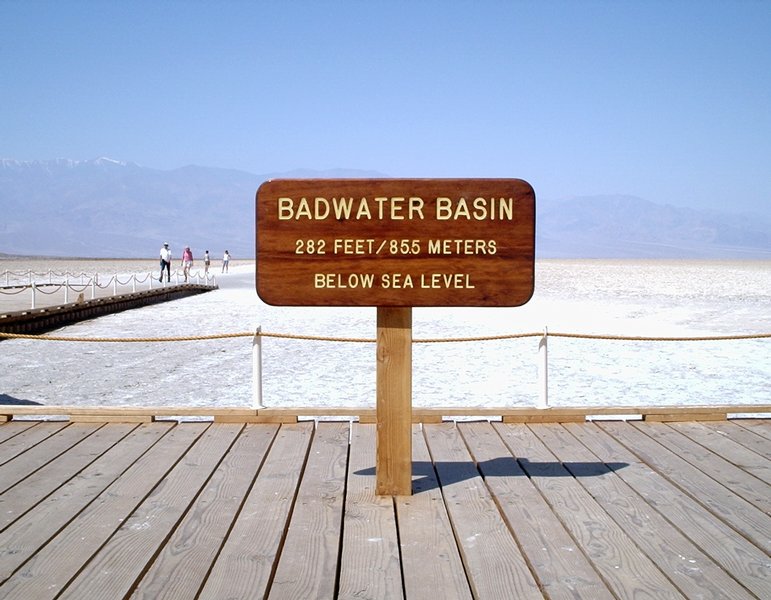
The lowest place in North America, Badwater, in Death Valley, is 282 feet below sea level. But you don't have the weight of the San Francisco Bay above your head and you're not whizzing along at 70 MPH down the rabbit hole.

Badwater
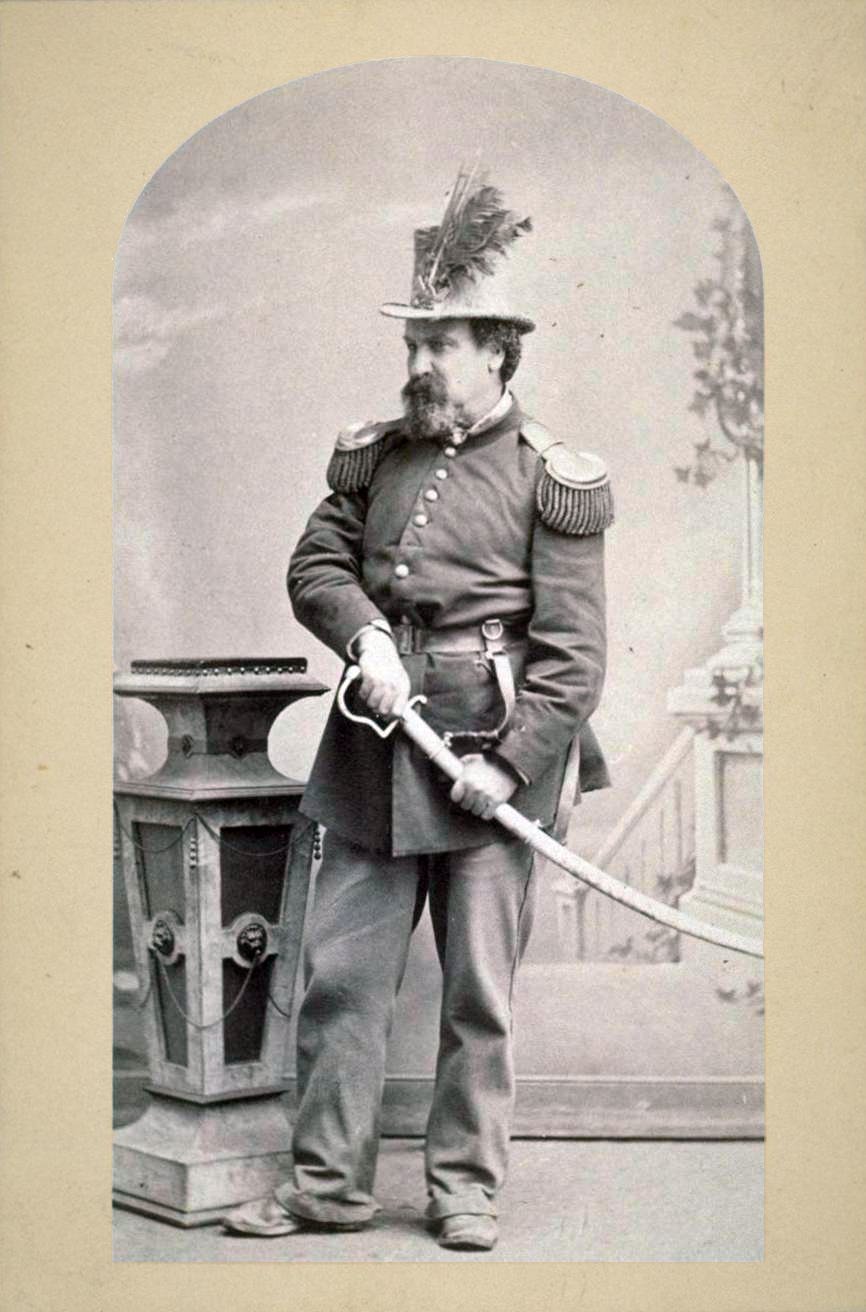
The idea of an underwater transbay tube along the bottom of San Francisco Bay was proposed in the 19th century by eccentric, some say he was mad as a hatter—Emperor Norton, the self-proclaimed "Emperor of these United States and Protector of Mexico." Norton, who abolished, congress, was literature's muse for many writers from Mark Twain, and Robert Louis Stevenson, to Neil Gaiman.

His Imperial Majesty Emperor Norton I, aka Joshua A Norton

The first transbay proposal was submitted by the builder of the Panama Canal in 1920—essentially the same plan BART used to build the world's longest and deepest sunken tunnel (in 1965-69, it opened in 1973). The tunnel withstood the 1989 Loma Prieta earthquake which destroyed the Bay Bridge.


But I digress. Definitely canals were invoked. Perhaps not the palindrome: a man, a plan, a canal—Panama! I had to do careful snorkel snorts both descending to the bottom of the bay floor and ascending to the SF Embarcadero stop. The trick is to know when to pinch your nostrils and how hard to blow—too much pressure and you'll damage your eardrum.

My eustachian tubes were truly plugged so it was touch and go. I was constantly yawning and rotating my lower jaw like a donkey to keep them open.

When you equalize the pressure between the middle ear eustachian tubes and the atmosphere, whether by yawning or blowing your nose, there is an audible pop, or click, which can be heard by others. But then, everything sounds loud—including your own voice—until the canal closes again.

Nothing was as bad as the time I had a head cold in Cuzco and when the bus descended from the Andean pass above Cuzco into the Urubamba Valley, I was screaming in pain, and John had to coax the busdriver to stop at the overlook.

I took so many Sudafeds to relieve the pressure, my heart was beating fast as a hummingbird's. I took so many Sudafeds I would've tested positive for drugs. Hell, I wanted drugs, to obliterate the pain.

Of course I was already technically on Andean drugs on account of the high altitude. Coca leaves and rock lime weren't cutting it. But my teeth didn't hurt. I couldn't even feel them or my gums.

My left eardrum blew—there was blood on the pillow the next morning. Things sounded weird for a long time. Sometimes when I get into a noisy space, my eardrum beats its tympanum with every noise.

My right eardrum is scarred from when I was a child and had double earaches on Christmas Eve. It must've been pretty bad because the doctor came all the way from Point Reyes Station on Christmas Day replete with his little black doctor bag. That's the only time my grannie ever called the doctor to make a house call.

Now, the problem is, that I've cleared my passages—that I can hear everything far too well. And I do mean everything. Rustling paper is excruciating. Other people's iPod earbuds are too loud. People thoughtlessly rustling their swag bags during a seminar had me moving seats early and often just to escape the noise.

MacExpo staff gave me a Ricola to suck on—which helped a bit. But the ambient noise in the hall was wearing my reserves down. Then there were all the Mac fans meandering in thundering herds and droves to negotiate around. 

I managed to make two passes around the exhibit floor to see if I had missed anything. I got some great technical advice on SSD hard drives from OWC, my go-to online store. But they didn't have anything for sale.

Aside from the maddening crowds, on the show floor there were a whole lot of guitarists, vague, blurred incarnations of Jimi Hendrix trapped in bowels of a bad Xerox machine, licking their so-called chops at every intersection—ostensibly showing off the latest music app or interface. ERG! 

Certainly the music toys were amazing—the musicians, not so much.

Of course I was looking forward to going to MacExpo on the final day as well, but today I feel so rotten, I think I'll pass. The only things I really wanted were a tiny iPhone speaker, and a bluetooth keyboard—and the prices weren't great. And I'm in no mood to actually listen to mini speaker performance, let alone, make a rational decision. I'm afraid I'd have at it with a flyswatter.

The swag was almost nonexistent. I would've liked getting my New York Times word portrait done but the line was too long yesterday and I'm not one for standing in line. Besides, it's not the same as back in the good old days, when Apple was part of the MacExpo matrix.

What happened to the delicious madness of MacExpo? Those magical Alice in Wonderland moments?

Most of the vendors were selling iPhone or iPad apps. I don't own either one. I played with some iPad drawing styluses, and a painting app. I prefer the real thing—pen, pencil. or pastel on paper. I drew a galaxy of star lilies as onlookers champed at the bit for their turn. Still, there was some amazing iPad and digital art at the art show.

There was very little software or hardware at MacExpo for the traditional Mac user to play with—other than offers from scanner and printer vendors who were touting their iOS compatibility horns. 

Yet the audience was jammed-packed with MacBook users. And no, they weren't just 50+ somethings. There were quite a few even older geezers present too. So much for the snide comment of one twenny-something to another about iOS apps, intended target audience—if you hafta ask—and rampant ageism. 

One young vendor asked why I was even attending the show since I didn't have iPhone or iPad—as if I was a Luddite. Other than the urge to smack him one, I too wondered why I was there. 

I'm not particularly interesting in owning an iPhone, or at least, not the hefty contract. I like my dumbphone's annual T-Mobile pay-as-you-go bill which costs me all of $200 a year. Can you say, hey big spender?

Besides, I can't even begin to read anything on the iPhone's tiny screen without going cross-eyed. Why would I want to surf on that? What I've noticed is that everyone's playing solitaire on their smartphones and tablets on BART. Wow. Think I'll stick to my Kindle for a while longer.

And I'm waiting for the iPad Retina to become available under Apple Refurbs before taking the plunge. Just because I keep elderly Macs up and running long past their expiration date, and I don't have an iOS gadget, doesn't mean I can't be savvy about the software. I was irritated, to say the least.

Swag levels are next to nil. The John Lennon Bus wasn't there either—they always had serious swag. Besides, they really put on a good show. Most of the vendors have tiny kiosks and stand around like it's a cocktail party. But no booze. No entertaining floor shows, not like in the good old days. 

Roxio wasn't there with their contests and funny prizes. I didn't see one of my favorite software developers, Roger Wagner who created the first graphic paint programs for Apple, and developed HyperStudio, used to run a mean Mac "pretzel bar" booth. The amazing conversations we'd have, and the people we'd meet, while hanging out with Roger as co-pilot.
Roger Wagner didn’t just read the first book on programming the Apple computer - he wrote it. Steve Wozniak
The seminars I had access to were mostly focused around iOS apps. This year's MacExpo star was the iPhone. My other cellphone is a dumbphone. One seminar on iBook (iPad) authorship was geared toward the traditional Mac user—lots of great tips on both platforms. 

The travel panel was good too. The Hollywood director/author who kitted up his iPad with a monopod, a wide-angle lens and a camera light to take videos of the show, was enthusiastically vouching the merits of the iPad and iPhone for big filming projects. 

I attend MacExpo to see the innovation. MacExpo is a bit like a Maker Fair. There were a couple of cool projects in various stages of development. Many solar panels and even a water battery recharger. Myriad iPhone skins and kooky iPad cases—my favorite kickstarter project, from the guy whose booth was a green teardrop trailer‚ was a bungee cord with four clown noses attached to the corners of an iPad. Wavy Gravy on a trampoline came to mind.

I did manage to get to the iFixit seminar, which I liked so much I attended it twice. Few women in the repair panel audience. I got some technical advice on fixing my MacBookPro inverter light. They said, piecaecake! I'd already replaced the hard drive with an Other World Computing SSD Seagate hybrid drive and got fantastic boot times—17 seconds.

MacWorld senior editor Chris Breen was moderator of the second iFixit panel. There was a lot of discussion on keeping older technology alive as it's next to impossible to truly recycle them—whether dumbphone or iPod. 

The trace rare elements used to make smartphones are lost, and the sheer amount of "upstream" elements needed to make our toys and gadgets was enormous. The latest MacBooks and the iPads, with throwaway technology, are not good for recycling—you can't separate the batteries from the frame—they blow up! 

So, we were of a like mind, in keeping our components alive for a s long as possible. The iFixit guys were impressed that I kept my PPC iMac alive for so long, and said the power supply was suspect in those old iMacs. It was replaceable as long as the capacitors weren't bad. 

However, with that said, they all agreed that trying to resurrect my 2005 PPC iMac probably wasn't worth it as I can't upgrade the software past Tiger. Chris Breen said it had a good run. Catch and release.

It was good to catch up with Chris after the panel. I reminded him of how he once beaned me with a little MacWorld office kit—back in the day when MacExpo swag was good. He laughed and said, I was lucky—he broke some other guy's tooth. Maybe Chris wanted to be a baseball pitcher in another lifetime.

I'm not much of a starstruck fan, though I was wearing an iFan pass. I admire Chris's wit and his intellect as a writer. He always writes back when I have a technical question. We had a sweet good old days moment. Dite. Angels dancing on a pinhead.

A spontaneous Steve Jobs shrine appeared last night. Flowers, Weird Mac thingies, candles. Something I would've like to have seen. So at least Steve was invoked.

Today, the MacExpo event is closing with a drumming circle.

Think I'll pass on that one too.


RELATED APPLE TECHNOLOGY POSTS

On iClouds & Motherships

Lloyd Reynolds' Calligraphic Legacy